
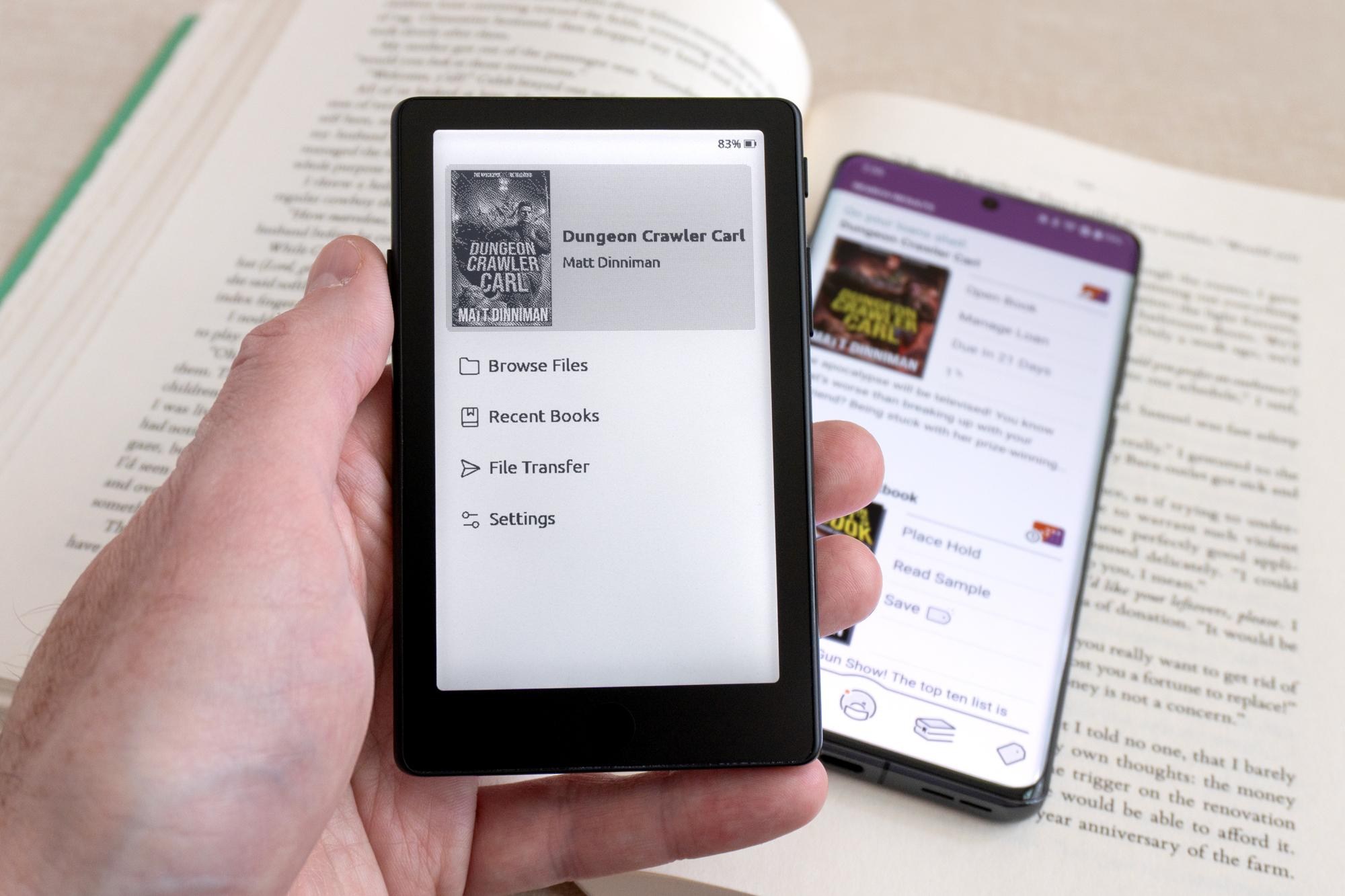
For years, the appeal of Xteink’s compact ereaders has come with a catch. Unlike Kindles or Kobos, which offer one tap access to thousands of store bought titles, Xteink’s devices forced owners to hunt down DRM free files themselves. That limitation is now fading. CrossPoint Reader, the free alternative firmware for the X3, X4, and X4 Pro, has introduced support for third party plugins, and one of the first community options lets these gadgets open DRM protected ebooks from Libby and Kobo.
CrossPoint Reader’s new plugin functionality is still in beta, but it is already available to anyone willing to try it. The development team supplied custom firmware that I have been testing on the X4 Pro for the past few days. The experience is not quite as polished as using Libby’s mobile app or Kobo’s native OverDrive integration, but it is far less complicated than I expected. If you are already comfortable with wirelessly transferring files to your Xteink device, moving library loans onto it requires only a few extra steps.
The first task is replacing the stock firmware that comes on Xteink’s devices with CrossPoint Reader. The simplest method is to connect the ereader to a computer through its USB-C port, power it on, and visit the CrossPoint Reader website in a browser. From there, you can select your specific model and the firmware version you want, then flash the update directly.
After the firmware is in place, download and install the new Plugin Store. The installation amounts to unzipping a few files onto the device’s microSD card. That adds a Plugins section to the homescreen, where several tools are available for download. The one that matters for this purpose is called “Protected Content.” It runs through the web server built into CrossPoint Reader, a feature that may sound intimidating but is actually straightforward to use, and it lets the ereader open ebooks protected by Adobe Digital Editions DRM.
To make the plugin work, you need a free ByteBooks account, or you can convert an old Adobe Digital Editions account that you have not touched in years. Once you log in and authorize the ereader, it can handle protected books. You also need access to Libby on a separate device, which requires a valid library card. Searching and downloading titles directly on the Xteink device is not possible because these ereaders are powered by low power ESP 32 processors.
Instead, you borrow a book through Libby on your phone or computer, then choose to download it as a protected EPUB file. What actually gets downloaded initially is a tiny ACSM file, which is a kind of digital key that an authorized reading app uses to reach the protected content. You move that ACSM file to the microSD card on your Xteink device, then trigger the Protected Content plugin. It processes the file, downloads a copy of the book, and places the EPUB onto the ereader, where you can read it for the length of the loan.
The same method works for ebooks purchased from stores like Kobo that use the EPUB format with Adobe Digital Editions. Amazon titles are not supported. If you are logged into the Kobo website rather than the desktop app, you can download an ACSM file for any book you have bought, copy it to the Xteink device, and run it through the plugin to unlock the readable file.
For those who want an even simpler Libby workflow, there is a separate app called Common Stacks. It is available for Android, Windows, and macOS, with iOS support planned for later. The app is built to provide access to multiple free ebook libraries, including personal collections you host yourself. It has full Libby integration and can send borrowed books straight to Xteink ereaders with a couple of clicks. Common Stacks still relies on CrossPoint Reader’s web server running on the device behind the scenes, but in my testing, getting a library loan onto the X4 Pro was just as easy as borrowing a book on my Kobo.
There are a few caveats. The selection of available library books depends on what your local library offers, and popular titles may require waiting if every digital copy is already checked out. Still, now that Xteink’s tiny ereaders can handle DRM protected ebooks from both borrowed and purchased sources, they have become a much stronger alternative to Kindle and Kobo devices.
With the arrival of CrossPoint Reader plugins, Xteink’s compact ereaders now offer a genuinely practical way to access library loans and store purchased DRM titles, making them a far more competitive option in a market dominated by Kindle and Kobo.